
forked-daapd allows you to set up an iTunes Media server that hosts all music, podcasts and audiobooks and shows
up in iTunes like a shared library. While other daapd implementations don’t work anymore with the current iTunes
versions, forked-daapd does.
Installation
forked-daapd does not provide packages for FreeBSD but luckily there’s an installer script, that works relatively good
for the basic installation. First, we need to install build dependencies:
pkg install git-lite sudoNow we can clone the forked-daapd repository from github:
git clone https://github.com/ejurgensen/forked-daapd.gitThe installation script can be found in scripts/ so we run:
cd forked-daapd/scripts/
./freebsd_install_10.1.sh
After installing the dependencies, the pkg command issued in this script prompted me to type y for yes, but the
script already went on with the next command. Ignoring this would result in an unusable installation so I canceled the
script using CTRL-C and restarted it, which solved the problem.
Jailed environments
The script wants to mount proc and descfs but as you’re not allowed to mount file systems in a jail, this will likely
fail. If you’re using ezjail, just ignore that problem. Jails by default get both file systems mounted automatically,
so you’re good to go.
Configuration
The main configuration file is located in /usr/local/etc/forked-daapd.conf, here’s mine:
general {
    uid = "daapd"
    logfile = "/var/log/forked-daapd.log"
    loglevel = log
    admin_password = "unused"
    ipv6 = yes
}

library {
    name = "iTunes media"
    port = 3689
    directories = { "/usr/local/itunes-library" }
    podcasts = { "/Podcasts" }
    audiobooks = { "/Audiobooks" }
    compilations = { "/Compilations" }
    compilation_artist = "Various artists"
}

audio {
    nickname = "Computer"
}

#airplay "My AirPlay device" {
#   max_volume = 11
#   password = "s1kr3t"
#}

spotify {
}

mpd {
}

sqlite {
}
As you can see, I decided to place my iTunes library in /usr/local/itunes-library. The script automatically creates
a daapd user, so be sure to chown your media library like that:
chown -R daapd:daapd /usr/local/itunes-libraryTo make mdns work, we also need to change the line starting with hosts: in /etc/nsswitch.conf:
hosts: files mdns dns
Now we can enable the services using:
sysrc forked_daapd_enable="YES"
sysrc dbus_enable="YES"
sysrc avahi_daemon_enable="YES"
service dbus start
service avahi-daemon start
service forked-daapd start
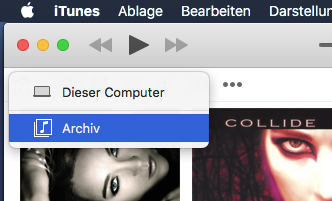
That’s it! Your media library should be visible from within iTunes:
Library maintenance
You might also want to provide an AFP share to enhance and manage your media library. Here’s how:
FreeBSD: Time Machine backup server with netatalk
Just remove the line time machine = yes from the afp.conf.