
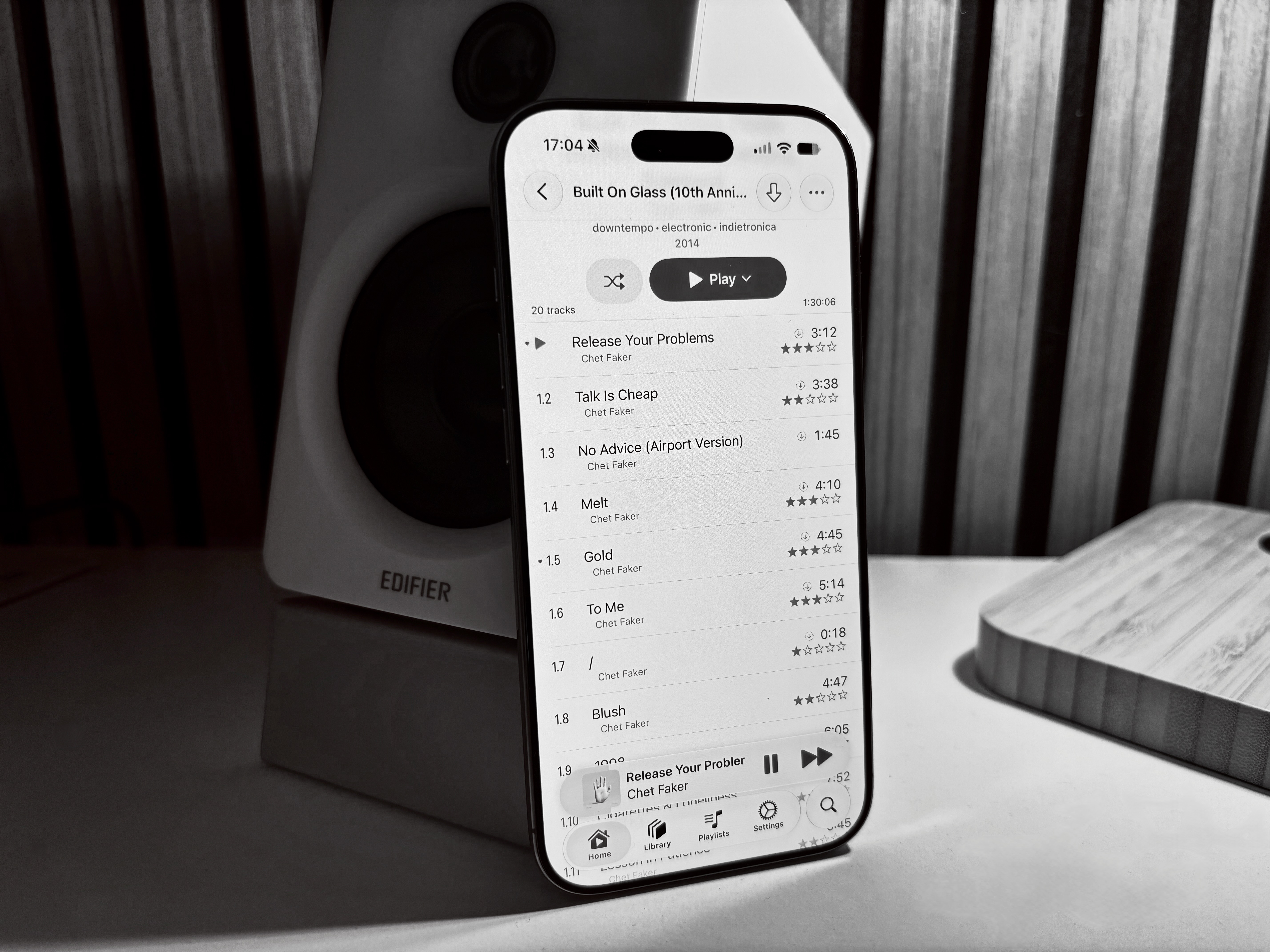
This month marks my eleventh year with Apple Music. I’ve been a customer pretty much since the service started, which back in the day finally let me get into music streaming. I was reluctant to use Spotify, mainly because of their artist payout model.
With the general streaming fatigue creeping into music for me too, I felt like I wanted to take ownership of my collection again and make growing it more intentional.
Physical media like CDs or vinyl are making a comeback right now, for exactly that reason - something I might explore myself at some point.
For now, though, my goal was to set up a comfortable, highly polished listening experience that lets me intentionally sit down with a good pair of headphones from time to time and simply enjoy music that I own, by artists that I want to support. A bit of me-time, rather than fiddling with the technology around it.
Introduction
After trying different solutions for a few months, I think I’ve found the best fit for my needs. When I said I don’t want to fiddle with the technology, that mainly applies to the actual listening experience. For this post, though, I want to give you a full walk-through of how I set everything up, how I grow and maintain my music collection, and what the resulting experience is like.
Here’s the shape of the stack, before we dive in: files on disk, tagged and organized with beets, get served by Navidrome over OpenSubsonic, and picked up by clients - Nautiline on iOS, or Music Assistant for my multi-room setup, which in turn drives my Sonos and AirPlay speakers. Each of those layers gets its own section below.
Goals and Non-Goals
I read through plenty of guides online, and while there are a few great resources to get started, most of them focus on the self-hosting side of things (which I enjoy too, of course). But for me, this time it’s about the music itself, and about getting the process out of the way as much as possible. That’s why, after initially looking into heavily automated pipelines, I ended up with a mostly semi-automated solution that combines the intentional collection of albums with the digital reality of streaming services: the best of both worlds, ownership and intentionality on one hand, ease-of-use and portability on the other.
I want to own my music collection and store it on my NAS, available both at home and on the go. While I occasionally enjoy playlists when out and about, I usually prefer listening to one album or artist at a time.
Client applications should feel polished and integrate nicely with the rest of my setup. I don’t mind them being closed-source, as long as they’re one-time purchases and don’t lock me into a proprietary format. They need to support playback to wireless speakers for casual listening, which isn’t a problem on iOS as long as the speakers support AirPlay.
That, in turn, makes transcoding support a necessity, because I’m usually too impatient to download full lossless tracks when I’m in the car (and don’t really need it there anyway).
The closest commercial solution to my problem seems to be Roon, but the proprietary ecosystem and steep prices basically make it a non-starter for me.
Audiophile or not
I’ve come to hate the term “audiophile”. It’s loaded with expectations of spending huge amounts of money on gear of questionable utility, and carries a whiff of elitism, snobbery, and snake oil.
According to Wikipedia, an audiophile is a “person who is enthusiastic about high-fidelity sound reproduction”. I don’t consider myself one in the classical sense, but that description resonates with me. I do enjoy high-quality captures of my music, especially on higher-end or reference-grade headphones at home.
I grew up learning instruments and would consider myself a sensitive listener. I don’t need speakers worth 10 grand, but something with good sound reproduction is definitely appreciated.
With that, the goal is to preserve as much fidelity as possible on the way to the speakers - to get the best possible audio quality, and to keep the library and tech stack from ever becoming the bottleneck.
For the purpose of documenting that, we’ll go inside out: starting with files on disk and ending up with my speakers vibrating.
The Core of the Library: Files on a Disk
My NAS has a growing collection of music that I’ve acquired over the years. It’s one of the things I never wanted to fully get rid of, even when I was using Apple Music for all my listening. The on-disk structure is anything but interesting:
Air-von-David:Musik() $ tree Chet\ Faker
Chet Faker
└── 2014 - Built On Glass (10th Anniversary Expanded Edition)
    ├── 01-01 Release Your Problems.flac
    ├── 01-02 Talk Is Cheap.flac
    ├── 01-03 No Advice (Airport Version).flac
    ├── 01-04 Melt.flac
    ├── 01-05 Gold.flac
    ├── 01-06 To Me.flac
    ├── 01-07 _.flac
    ├── 01-08 Blush.flac
    ├── 01-09 1998.flac
    ├── 01-10 Cigarettes & Loneliness.flac
    ├── 01-11 Lesson in Patience.flac
    ├── 01-12 Dead Body.flac
    ├── 01-13 Killswitch.flac
    ├── 01-14 VHS New (1998 Demo).flac
    ├── 01-15 1998 (Nick Murphy Remix).flac
    ├── 01-16 Gold (Flume Rework).flac
    ├── 01-17 1998 (Live at the Enmore Theatre).flac
    ├── 01-18 Dead Body (Live at the Enmore Theatre).flac
    ├── 01-19 To Me (Live at the Enmore Theatre).flac
    ├── 01-20 Talk Is Cheap (Live at the Enmore Theatre).flac
    └── cover.jpg

2 directories, 21 files
I just found this to be the most ergonomic for me. Artist first comes naturally, then year, then album - that makes for easy sorting, since I usually want to view the album list chronologically. The files start with disc number, then track number, followed by the song title. Every folder holds a high-res cover.jpg.
I mix singles, EPs, and albums in the folder list for no particular reason - it just doesn’t matter to me, and I rarely browse albums directly on disk anyway. Compilations are the one exception: I keep them in a separate Compilations folder, followed by the album name and then the files inside, following the same convention as above.
Lyrics are embedded in the files instead of sidecars whenever possible.
The Quality Question
I try to get everything in 24-bit FLAC at the highest possible sample rate. The reason is simple: this is the first link in my playback pipeline. If the quality is already bad here, there’s no way to recover it further down the chain. Getting the highest quality possible gives me the headroom to run really good speakers and still have music that sounds good.
Plus, fidelity-wise, it’s basically what comes out of the studio’s mastering pipeline anyway. Sure, that’s probably PCM, but since FLAC compresses the audio losslessly, the full fidelity is preserved.
Library & Metadata Management
It took me a long time to discover beets - a CLI tool for music library management that’s very extensible with plugins. It maintains an SQLite database on disk with metadata about the library. When you import data, it does a metadata lookup against various configurable sources, then either adjusts the metadata on disk directly or defers that to a separate step, as well as copying or moving files into a clean library structure. I installed plugins to also handle hi-res album art and lyrics.
MusicBrainz as the Primary Metadata Source
I looked at various online services like Discogs, but figured MusicBrainz provides the best overall structured metadata. It’s a project akin to Wikipedia, but for music specifically. It covers over 95% of my library, basically everything except for the very niche artists. It also comes with a free API that doesn’t even need authentication, so it’s easy to set up. I use it as my canonical metadata source, which gives me a consistent search and listing experience across players, especially for files that were purchased (or ripped, etc.) from different sources.
Using beets
Inconveniently, the CLI command for beets is beet - once I figured that out, it was relatively straightforward to use. First, you create a config to tell it how you want your library to look. You can edit it with beet config -e. Here’s mine:
directory: /Volumes/Musik
library: /Users/david/Musik/beets.db

import:
    # --------------------------------------------------
    # Initial safety settings
    # --------------------------------------------------
    copy: no
    move: yes
    write: yes

    # Ask before accepting every match.
    timid: yes

    # Show all track-level details during matching.
    detail: yes

    # Do not automatically accept uncertain results.
    quiet: no
    none_rec_action: ask

    # Useful when restarting a long import.
    resume: ask

    # Initially leave this disabled.
    incremental: yes
    incremental_skip_later: yes

paths:
    default: $albumartist%asciify{}/$original_year - $album%asciify{}%aunique{}/$disc-$track $title%asciify{}
    singleton: $artist%asciify{}/$original_year - $title%asciify{}
    comp: Compilations/$year - $album%asciify{}/$if{$multidisc,$disc-}$track $artist%asciify{} - $title%asciify{}

# Name used for downloaded sidecar artwork.
art_filename: cover

plugins:
    - musicbrainz
    - fromfilename
    - fetchart
    - embedart
    - lyrics

musicbrainz:
    data_source_mismatch_penalty: 0.3
    genres: yes
    search_limit: 5
    search_query_ascii: no
    genres_tag: genre

    external_ids:
        discogs: no
        bandcamp: no
        spotify: no
        deezer: no
        tidal: no

    extra_tags: []
    aliases_as_credits: no

fromfilename:
    data_source_mismatch_penalty: 1.0

lyrics:
    # Do not contact lyrics providers during initial import.
    auto: yes

    # Prefer timestamped lyrics when manually requested later.
    synced: yes

    # LRCLIB is currently the source that supplies synced lyrics.
    sources:
        - lrclib
        #- genius

    force: yes
    print: no

fetchart:
    auto: yes

    # Search remote canonical art before existing local files.
    sources:
        - coverart: release
        - coverart: releasegroup
        - itunes
        - filesystem

    # Retrieve the largest image offered by the source.
    high_resolution: yes

    # Reject images with obviously non-square proportions.
    enforce_ratio: yes

    # Keep source information in the database.
    store_source: yes

embedart:
    auto: yes

    # Downscale only the embedded copy.
    # The external cover file can remain higher resolution.
    maxwidth: 1500

    # Keep cover.jpg after embedding.
    remove_art_file: no

    # Do not remove existing embedded artwork automatically.
    clearart_on_import: no
Note that this needs a few plugins installed, but beets will fail loudly with errors telling you exactly what’s missing.
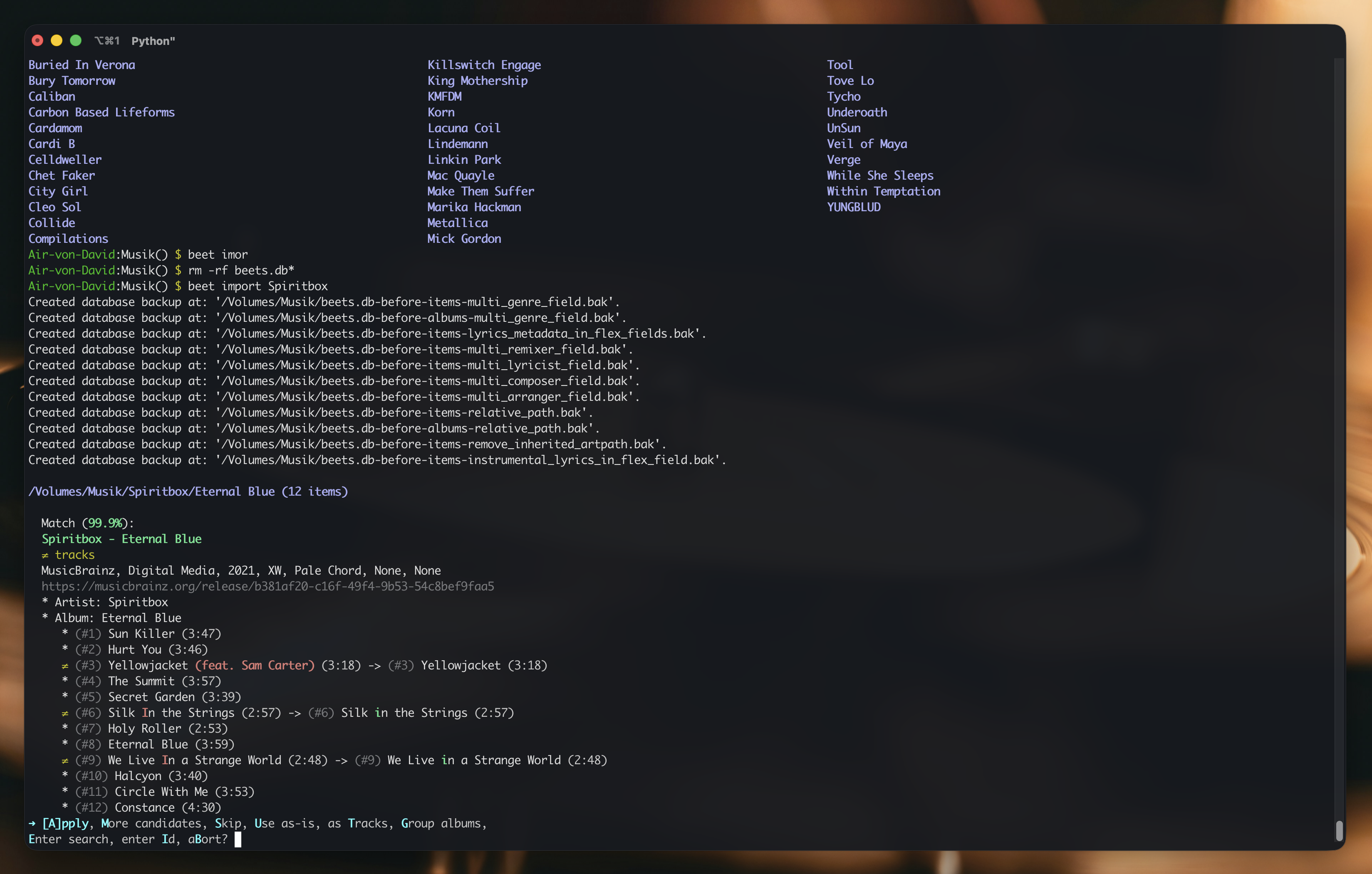
The config is relatively straightforward, however I want to point out the %asciify{} modifiers. Beets seems to be bad with non-ascii characters, especially on network drives. Without that, all french accents and german umlauts made the import crash, so you’ll probably want to set this.
Optimally, the target directory starts out empty. I keep my old, inconsistently organized and badly tagged collection in a separate folder and gradually clean it up by importing it into beets. The import itself does all of the work in one pass: because move and write are enabled, beets writes the selected metadata directly into the files and moves them from the old collection into the new library at /Volumes/Musik, following the configured path templates. This means the source collection gets smaller while the clean library grows, rather than maintaining two copies of every album.
The enabled plugins also fetch a high-resolution cover.jpg, embed a copy capped at 1,500 pixels, and retrieve synced lyrics from LRCLIB. All of those metadata lookups and downloads make an import relatively slow, especially for large albums or batches. That’s normal: beets is contacting several external services and processing each file before it reaches the final library. However, moving the SQLite files for the library off of my network share greatly improved performance. Since the import also moves files out of the source location, it’s probably best to test the setup with one artist or album first:
Air-von-David:Downloads() $ beet import Spiritbox
Created database backup at: '/Volumes/Musik/beets.db-before-items-multi_genre_field.bak'.
[...]
Created database backup at: '/Volumes/Musik/beets.db-before-items-instrumental_lyrics_in_flex_field.bak'.
/Volumes/Musik/Spiritbox/Eternal Blue
/Volumes/Musik/Spiritbox/No Loss, No Love (2025)
/Volumes/Musik/Spiritbox/Perfect Soul (2024)
/Volumes/Musik/Spiritbox/Rotoscope (EP) (2022)
/Volumes/Musik/Spiritbox/Singles Collection (EP) (2019)
/Volumes/Musik/Spiritbox/Spiritbox
/Volumes/Musik/Spiritbox/The Fear of Fear (2023)
/Volumes/Musik/Spiritbox/Tsunami Sea (2025)
It prompted me with metadata matches for each album, and got some wrong - but it’s easy enough to pick the right one from the menu or search for something else. For a big library, that’s probably tedious, but I’d rather do it correctly once. The pauses after accepting a match can feel surprisingly long, but they’re expected while beets writes the tags, moves the audio files, and handles artwork and lyrics. Once an import finishes, no separate cleanup commands are necessary: the old copy is gone and the cleaned-up files are ready in the new library.
Navidrome at the Center of my Collection
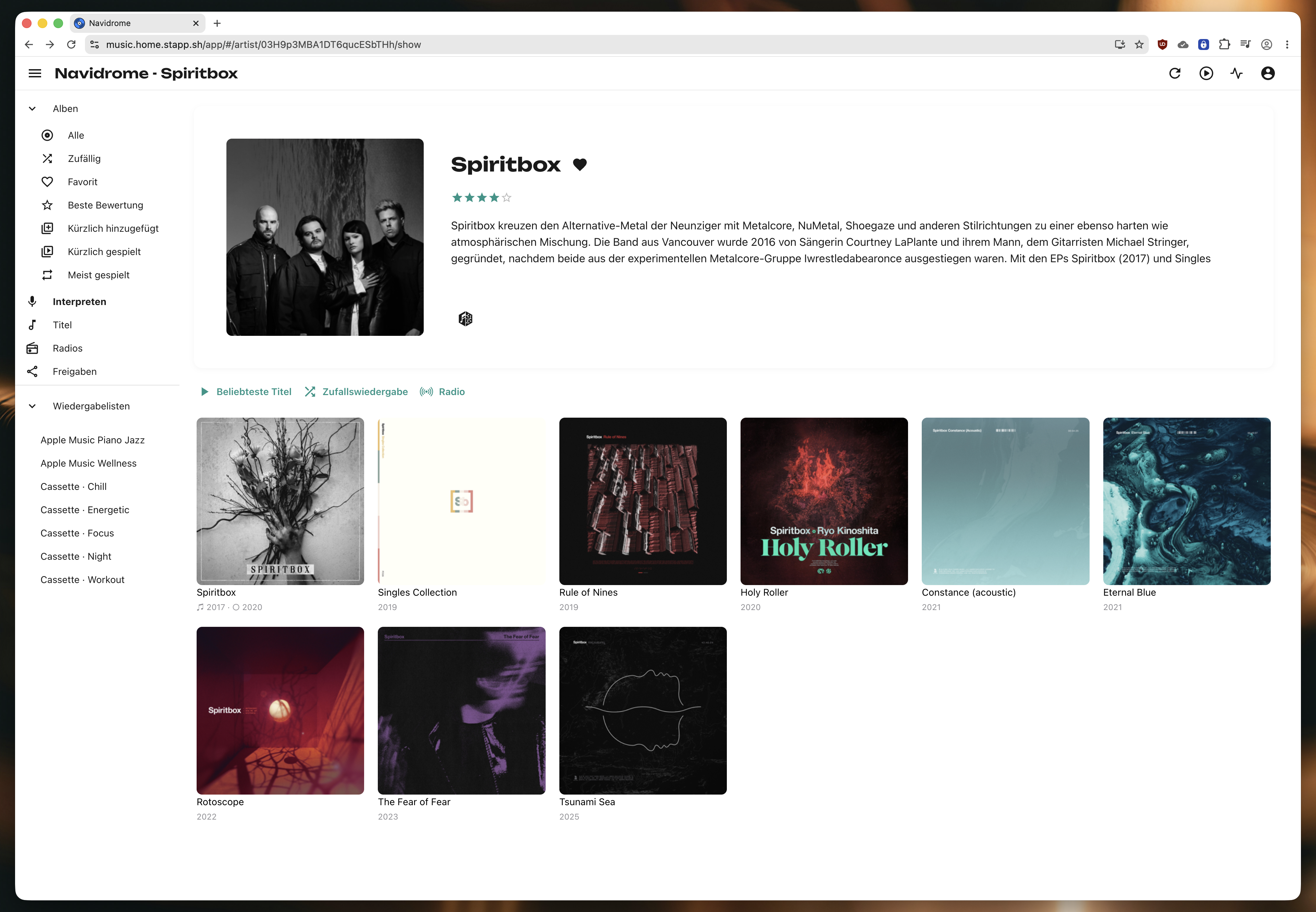
Moving out one layer from the on-disk structure, we’re at the edge that actually serves my music library. After trying Plex and Jellyfin first, I settled on Navidrome - mainly because it’s a dedicated music service, not a fully fledged media center that treats music as an afterthought. It’s simple and lightweight, written in Go, and interfaces with Subsonic-compatible clients via the OpenSubsonic protocol. That opens up a whole universe of client apps, which is one of the biggest benefits. The web UI isn’t pretty and is somewhat clunky, which, coming from a highly polished streaming service, feels a bit ass-backwards. Even its theming support, while making it look nicer, doesn’t fix the fundamental mismatch between its navigation model and how my brain works. It’s serviceable, though, since I only ever touch the web UI to kick off library scans (for now, more on that later).
I set it up in a Docker container, running in a VM on my FreeBSD NAS. Since my music collection lives on an SMB share on the NAS itself, I set up a CIFS-based read-only volume pointing to that share. Here’s my compose file:
services:
  navidrome:
    image: deluan/navidrome
    restart: unless-stopped
    ports:
      - 4533:4533
    environment:
      ND_LASTFM_ENABLED: true # TODO why do i even have that?
      ND_LASTFM_APIKEY: <>
      ND_LASTFM_SECRET: <>
    volumes:
      - ./data:/data
      - music:/music:ro

volumes:
  music:
    driver: local
    driver_opts:
      type: cifs
      device: //10.14.20.238/Musik
      o: username=user,password=pass,vers=3.0,iocharset=utf8,uid=1001,gid=1006
The important part is getting the permissions mapped properly, so Navidrome at least has read access to the files.
After it started up, I added it as a service on my Tailnet to access it from anywhere, set up my primary music library, and switched the theme to “Nautiline” for at least some visual comfort.
It picked up my music, and I was able to browse it. The first time around, many albums showed up multiple times (each with only a handful of tracks), some with terrible artwork and some with information missing outright - typical metadata issues. On the second attempt, after discovering beets, it looked perfectly fine.
Scrobbling
Navidrome also supports scrobbling - essentially automatic tracking of your listening history with an external service, which can, for example, be used as a baseline for discovering new music. Last.fm and ListenBrainz are probably the most common choices, and I went with the latter because I’m more comfortable keeping my listening history with a community project than with a company. As the name implies, it’s a sibling project of MusicBrainz, run by the same MetaBrainz Foundation. Scrobbling can often be set up on the client too, but since Navidrome already supports it on a per-user basis, I just set it up directly from the server.
Client Apps
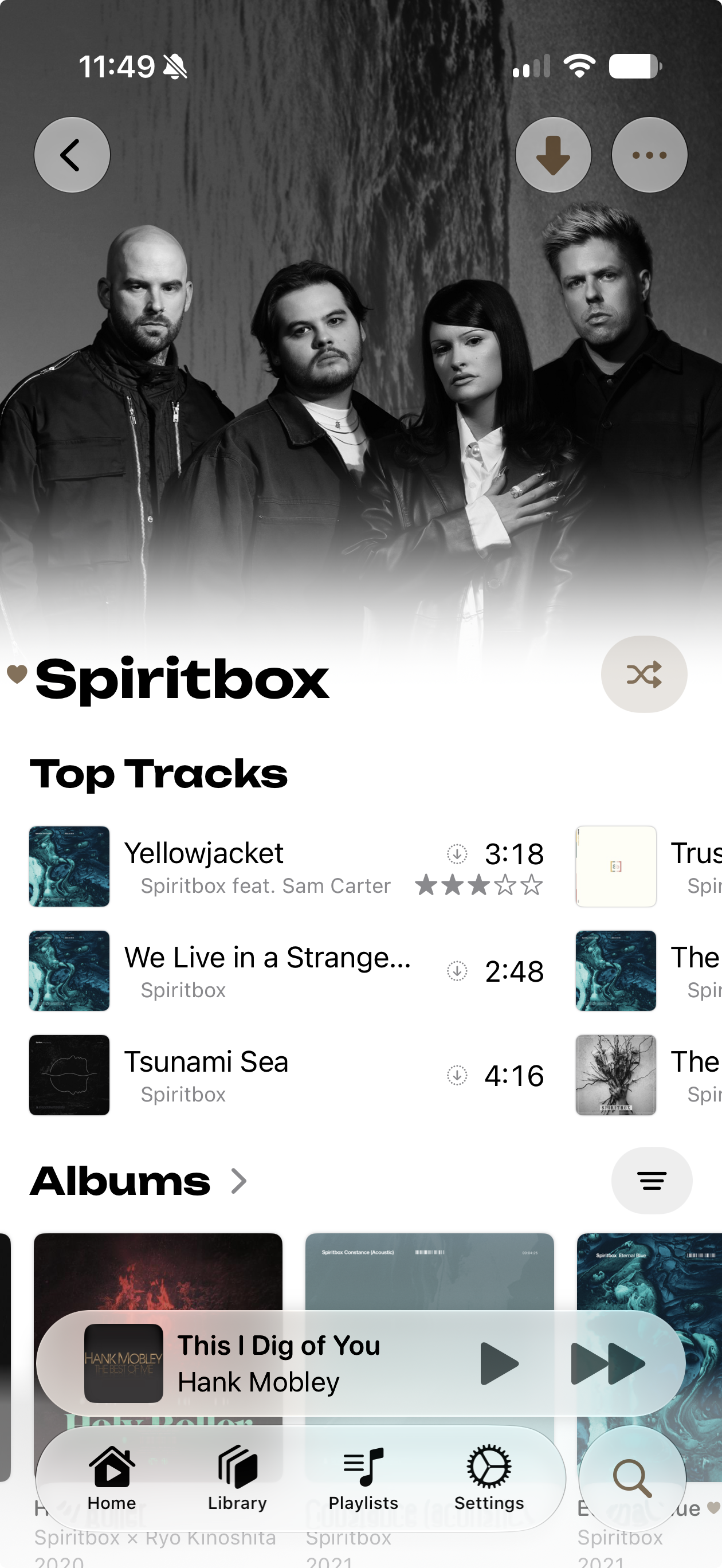
Moving out one more layer, we’re at the devices that actually do the playback. That’s primarily my iPhone on the go, and sometimes my Mac at home. Most of the time, though, it’s playback to my multi-room audio setup, which we’ll get to in the next chapter. For iOS, I ended up using Nautiline, an OpenSubsonic client. Not because it has the most features or the most tunable playback experience, but because it looks and feels good, has nice typography, and, most importantly, puts the music first. It’s a few bucks as a one-time purchase, but I can wholeheartedly recommend it.
Since it’s the client I always use on the go, I really appreciate both the offline download of specific songs and albums, and the automatic caching, which fills a set amount of storage with music you’re likely to play based on history or favorites.
It also supports transcoding, which is great, because my whole library is lossless and I don’t want to deal with the sheer size of each album on a metered connection. I transcode to 192kbps Opus, which works well because (a) Opus is a great codec at that bitrate, and (b) my typical playback devices are my car stereo and my AirPods - neither the kind of speakers where the last sizzle of a cymbal is audible, let alone important.
Home Audio
My home speaker setup, however, is where quality starts to count. My multi-room audio setup is currently still a mixed bag: cheap AirPlay speakers (some Libratone, some HomePods, etc.), some mid-tier but genuinely enjoyable speakers like the Sonos Play 5 in my office, alongside a newer Era 100 for casual kitchen listening, plus a few pairs of decent headphones (that could use better preamps, and probably a wireless-integrated system using Sonos Port or something more DIY like Squeezelite).
In general, I try to settle on Sonos - not because the company has made the best decisions over the last few years, of course, but because bottom line, the speakers are solid audio-wise, with good extension points like Port or Amp for wiring more traditional stereo setups into the network, and because the protocol is, to me, much more reliable than AirPlay.
That’s mainly because AirPlay, in good old Apple fashion, is as opaque as possible about which of two modes it’s actually using. Most apps default to relaying realtime audio from the controlling device to the speaker - true for both OG AirPlay and AirPlay 2. The alternative is buffered, remote playback, where each speaker fetches the source independently and plays it back on its own - that’s what you actually want, but it only works with select sources and apps. Since the default mode streams live from the controlling device, the handshake tends to be relatively unreliable, depending on the wireless situation.
Each Sonos speaker, on the other hand, has a local API that controller devices can speak to in order to initiate playback. The source can be arbitrary streamable media, and the network between the Sonos units takes care of distributing playback and sync information internally, demoting the controlling device - like a phone - to a mere controller, not a streaming source.
And while Sonos made some weird decisions in the past, with their speakers effectively controlled from the internet rather than locally, to this day, after the initial setup, you can just turn off internet access for the speakers and use them entirely locally - e.g. with a controller like Music Assistant.
Entering Music Assistant
And this is exactly what I’m doing. Music Assistant is a labor of love from the Home Assistant ecosystem’s Open Home Foundation, providing open source controller software that can consume music from many different sources, including OpenSubsonic (important for us), and render audio to various target systems, including AirPlay (important for my legacy devices) and local Sonos (my primary playback path going forward).
If you already have a Home Assistant setup, you can install it directly as an add-on there, but I run it standalone on the same system that also runs Navidrome. I won’t go into much detail on the ins and outs of setting this up - there’s good documentation over on the Music Assistant homepage.
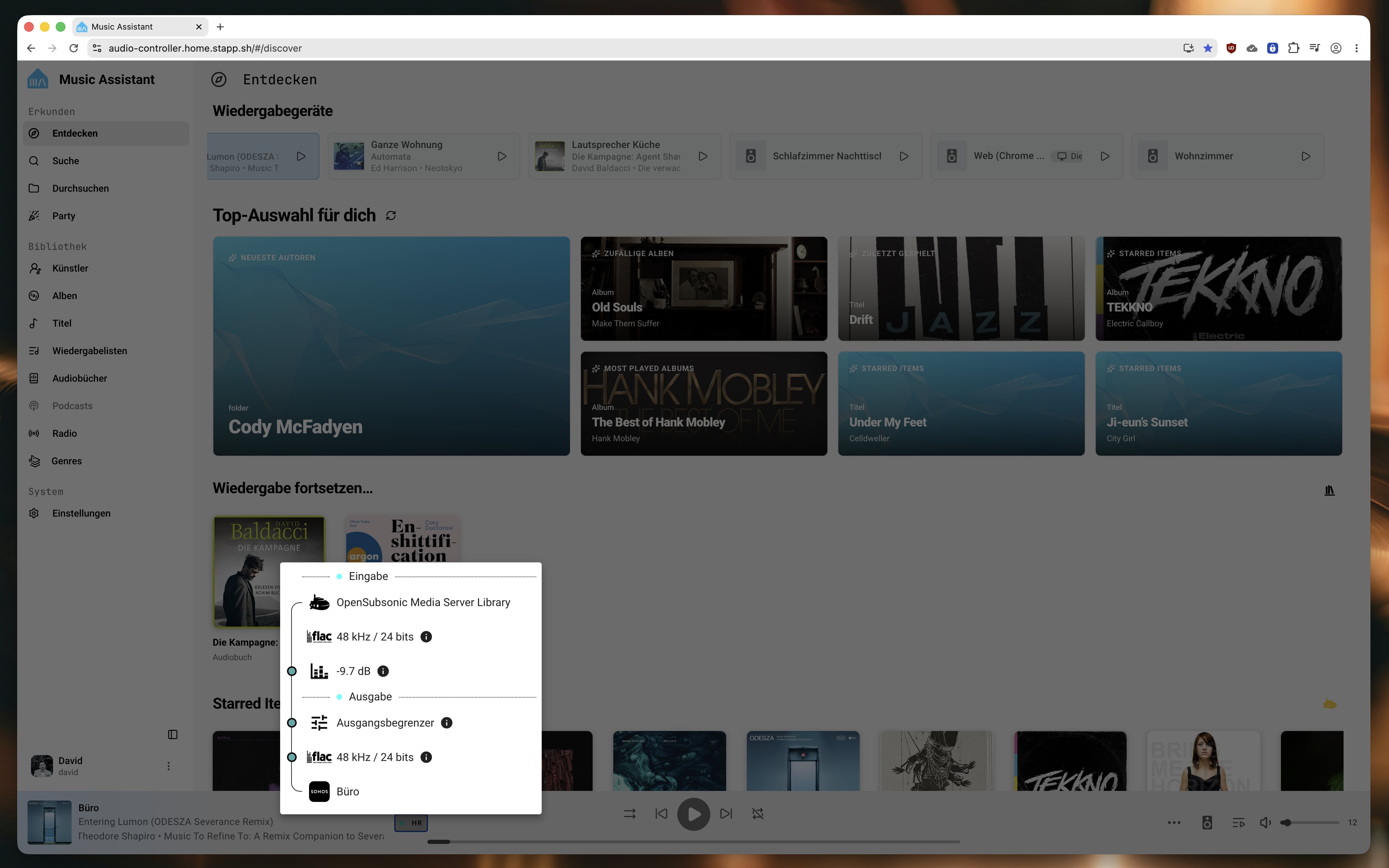
I set up a connection to Navidrome (and Audiobookshelf, since I was already at it), and it auto-discovered my speakers, both AirPlay and Sonos. I set the preferred audio route for the Sonos speakers to the Sonos protocol (since Sonos also supports AirPlay) and created a playback group covering all the speakers in the house. While the UI isn’t exceptional by any stretch, its PWA is more than usable on both desktop and mobile, and there are touches that show real attention to detail and to the target audience, like the audio pipeline visualization.
Aside from that, it’s really great to have a separate, hard-wired controller that isn’t my phone, especially when dealing with legacy AirPlay.
Bonus: Buying Music
Like everyone with a music collection grown over multiple years, sometimes even decades, there’s music in there so old I don’t even remember how I got hold of it. But it’s 2026, and I think we have to face reality: starting from the streaming era, and probably even earlier, but at least since the rise of AI-generated music, it’s more important than ever to support your favorite artists - not necessarily their label and the rest of the machinery, but the artists and people involved in making it. This is a big part of why I never really used Spotify: look at their payout model for artists, and it becomes clear that it isn’t a way to support the artists you love, but Spotify and the labels. Just look it up.
Still using Apple Music as a fallback for things I don’t yet have in my library, I’m steadily growing my own collection. For artists I explicitly want to support, aside from buying tour tickets and merch, I usually reach for their own shop or Bandcamp page first, or the label’s website if it’s a small label - that way, most of the benefit goes to the people who deserve it most. The next best stop is Qobuz, a good option since they have a large, varied catalog with hi-res options available for most albums. And there’s still always the option of picking up cheap CDs and ripping them, just like in the good old days.
Final Verdict
Is it some effort, and sometimes tedious? Yes. Is it as dead simple as just opening Apple Music and hitting play? No. But that’s the whole point. I wanted to get back to intentionally enjoying music. With the technological questions settled upfront, taking good care of the music I finally own again has become something of a hobby in itself, instead of just having access to an ephemeral (if huge) collection on streaming services. And I enjoy both the process and the experience.
The one thing I really wish existed is an open alternative to Roon - with artist biopics, detailed album art, graphs relating band members to other artists, and so on. Something to get a glimpse of the people behind the music, humans expressing themselves and their emotions. Because isn’t that what it’s all about?
References
- https://roon.app/en/
- https://en.wikipedia.org/wiki/Audiophile
- https://xiph.org/flac/
- https://en.wikipedia.org/wiki/Pulse-code_modulation
- https://beets.io/
- https://www.discogs.com/
- https://musicbrainz.org/
- https://www.navidrome.org/
- https://opensubsonic.netlify.app/
- https://listenbrainz.org/
- https://nautiline.app/
- https://opus-codec.org/
- https://www.sonos.com/en-us/shop/five
- https://www.sonos.com/en-us/shop/era-100
- https://www.sonos.com/en-us/shop/port
- https://www.music-assistant.io/faq/stream-to/
- https://www.digitaltrends.com/home-theater/apple-airplay-2-explained/
- https://github.com/SoCo/SoCo/wiki/Sonos-Protocol-Information
- https://www.music-assistant.io/
- https://www.rollingstone.com/music/music-features/should-spotify-change-the-way-it-pays-artists-763986/
- https://www.qobuz.com/