
I have somewhat of a pendulum going on between iOS and GrapheneOS. But just like I switched from macOS to Linux some time ago, I want to run GrapheneOS as my daily driver as well.
Part of that is frustration with US Big Tech licking Trump’s butt. But it’s also part of a broader shift: with movements like “Digital Independence Day”, I want to take back control over my smartphone - and hopefully stick with that this time.
I picked up a used Pixel 9 a few weeks ago and directly flashed GrapheneOS on it. Looking at the support matrix on the GOS website, I’ll get updates for my phone until August ‘31, so I guess the 300 bucks I paid are worthwhile. Using the newest Android version for the first time, I was immediately delighted by the speed and snappiness of the system and while it’s sub-par compared to the iOS UX, it’s more than good enough to use day by day.
Why GrapheneOS
I already elaborated on that in my original post about switching to GrapheneOS from 2023, so you can read it up there. Not much has changed in my reasoning and the explanation I gave then.
Overview of My Setup
I run my main profile completely without Google Play Services. That way, I’m fully independent from Google in that area. For the few apps that need Play Services for one reason or the other (or for no reason at all), I set up the Private Space feature, which is basically an isolated profile (similar to Android’s user profiles), but with better UX, as it is simply integrated in the main profile’s app launcher.
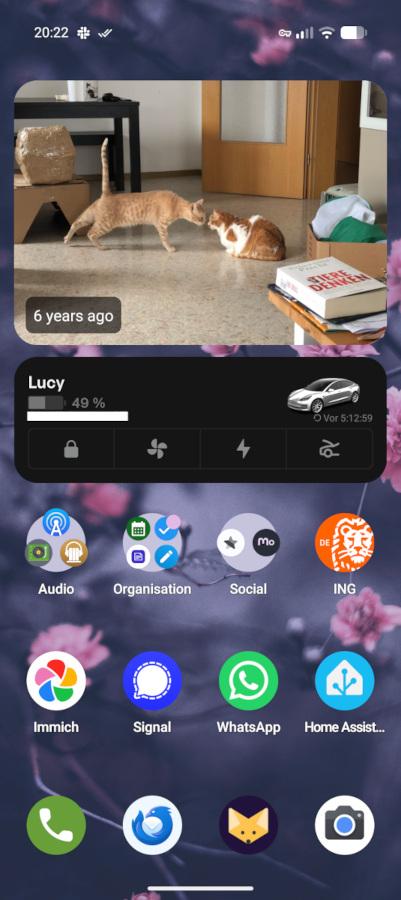
I use FUTO Keyboard as my keyboard of choice as it looks and feels nice, has a good enough German dictionary and even supports offline speech-to-text. I’m using FossWallet over Catima now for my loyalty cards because it can render iOS .pkpass files the way that they are actually supposed to look. KDE Connect does the Apple-style handoff thing with a shared clipboard and easy file transfer between my laptop and my phone, Organic Maps is my preferred maps/routing app, I use Tailscale (with my own coordinator server instead of their hosted control plane) to access services at home while on the go, and I replaced the stock dialer with Fossify Phone. That’s pretty much it when it comes to the special sauce.
A Life Without Play Services
Somewhat unsurprisingly, almost all apps I use day to day work without Play Services. That’s for a simple reason: they are almost exclusively open source and from third-party sources like F-Droid, so you would imagine that they at least don’t hard-depend on Play. What surprised me more is that even the few proprietary apps I have to use day to day also seem to work somewhat fine: Cookidoo (for the fancy kitchen appliance), ING (my main bank), PayPal and the Tesla app (yeah I know sighs) all work just fine without the Play Services for the most part. There are a few features that I cannot use, namely push notifications, NFC payment and embedded maps, but those are things that I happily skip, knowing that this way they cannot communicate with Google.
Self-Cloud Services
The biggest problem for most people probably is cloud services. They’re either stuck in iCloud or GApps. Since this is a blog about self-hosting more than anything else, I luckily don’t have these problems. My photos are in Immich, files in Opencloud, contacts, calendars and reminders in Radicale, email in Dovecot, notes in Nextcloud Notes, etc., all hosted in my basement rack. Here’s an overview of the services I run and the apps I use on GrapheneOS:
| Description | Backend Service | Android App |
|---|---|---|
| Podcasts | gpodder2go | AntennaPod |
| Audiobooks | Audiobookshelf | Audiobookshelf |
| Passwords | Vaultwarden | Bitwarden |
| Contacts | Radicale | DAVx5 |
| Calendars | Radicale | DAVx5 + Fossify Calendar |
| Reminders | Radicale | DAVx5 + Tasks.org |
| Media | Jellyfin | Findroid |
| Find My | FMD Server | Find My Device |
| Home | Home Assistant | Home Assistant |
| Photos | Immich | Immich |
| Notes | Nextcloud | Nextcloud Notes |
| Files | Opencloud | Opencloud |
| Documents | paperless-ngx | Paperless Mobile + paperless-ngx Uploader |
| News | Miniflux | Read You |
| Music | Navidrome | Tempus |
| Dovecot + OpenSMTPd | Thunderbird |
UnifiedPush for Notifications
As Google Play Services normally funnel notifications to only have a single persistent background process and hence save battery, most apps rely on them, unless they are obviously schedulable things like alarms or reminders (those are handled by a native Android API).
In a world where Play Services don’t exist, each app that wants to receive push notifications needs to persistently run in the background and keep connections open to get informed once a new notification comes in. That drains the battery pretty quickly.
Luckily, there’s an alternative: UnifiedPush (UP) allows you to use (and even run) other servers than Google’s to have push notifications delivered. On the phone, a “UnifiedPush Distributor” app runs persistently in the background, allowing apps to register for push notifications and waking them up in case there’s something for them. So a full replacement for push notifications via Firebase/Google Play. Well, at least in theory.
Unfortunately, there’s no way to hook existing APIs to make any app work with UnifiedPush. And even if there were, the push URLs that UP servers provide would need to be supported by each app’s respective backend services. So UnifiedPush needs to be explicitly supported by apps. In a FOSS world, that’s not a big problem since there are many people running on phones without Play Services anyway, but in the proprietary world, who would even consider UP if there are Play Services?
I still found a few apps that support UP and I use it whenever possible, because every app with UP support is one that does not need to drain battery in the background:
- DAVx5 (a CalDAV/CardDAV provider)
- FOSS-Warn (a FOSS replacement for KATWARN/NINA, emergency warning apps in Germany)
- Find My Device
- Element X (Matrix chat client)
- Moshidon (Mastodon client)
- Fennec (FOSS Firefox fork, so proxying Web Push)
In case you’re interested: I run my own Ntfy server that I use for push notifications, and I also use the Ntfy app as my UnifiedPush Distributor. That’s how I receive Home Assistant notifications as well. I didn’t mention it in the list because the app doesn’t officially support UP, but you can just push a message to Ntfy from the server instead of sending it to the app itself.
Banking Apps & Other Details
Aside from ING, which are big chads for neither enforcing hardware attestation from Google (i.e. checking device integrity via Play Services) nor depending on Play Services (if they would now only have their own NFC payment solution), I have to use a few other financial apps that unfortunately do. Namely Kontist (a german bank focused on freelancers and small business owners), Stripe (payment service provider) and C24 Bank. While all of them technically work, they do need Play Services, otherwise they won’t start. That’s sad, but I run them in the Private Space. This is also where Slack (push requires Play Services) and Satellite (my business VOIP line) live. I’m gradually trying to get rid of these services and find replacements that work in a Google-free world.
No NFC payment
GrapheneOS does not support Google Pay and there are only a handful of other services that offer their own payment solution. One is Curve, which also needs Play Services and since I don’t run them in my main profile, I cannot use it. In Germany, there are a few banks that have their own wallets (Sparkasse and Sparda for example) but I’m not a customer there, so I’m resorting to pulling out my Girocard (our preferred local debit card solution) whenever I need to pay at a store. That also has the benefit that my transaction does not go through US-based servers from VISA or MasterCard. Not optimal, but maybe at some point I find an NFC wallet app that works with my bank and Girocard.
Some Google Shenanigans
While trying to get away from Google as much as possible, there’s one thing I cannot get rid of for reasons: the Google Camera arguably provides the best quality images. And since I want to capture memories at the highest fidelity possible, I still use their camera. Consequently, to see previews of the photos I just took, that means I need to have Google Photos installed as well. I simply set up Storage Spaces (GrapheneOS’ per-app storage sandboxing) for Google Photos so that it only sees the files it created itself, and removed the network permission for both of the apps, meaning they cannot communicate with the outside whatsoever, basically making it a non-issue for me.
Improved Privacy with Web Apps
Last but not least: There are simply services that I don’t need an app for. I currently don’t have any commerce apps installed. No Amazon and no Galaxus. If I’d need quick access to them and for some reason, I would not be able to use a browser anymore, I could simply install their website as a Web App, which would end up on my home screen with either a shortcut to the browser, or, in case the site features a PWA, with a web app that could even support push notifications (in my case Web Push -> Ntfy -> Fennec -> PWA). Those apps have very limited impact on the privacy of my device, even without using the power that comes with the GrapheneOS app sandbox. And let’s face it: Amazon’s “App” anyway is just their website in a wrapper, so why not use the website directly then?
If you use any of these open source apps, especially from small indies, please support them with a few bucks if you can afford it!